



|
|
|
|
|
| How To Navigate |
|
1. Navigation Map
2. Area maps Map-A, Map-B and Map-C
You'll see navigation buttons
A red square  indicates that photograph of the spot are available.
Click a red square to see a photograph.An image JPEG file is around 50Kbyte (30K-90K) in size.To download whole phograph image ,it takes about 5 to 15 seconds with a 64Kbps ISDN and 10 to 30 seconds with a 28.8Kbps modems. indicates that photograph of the spot are available.
Click a red square to see a photograph.An image JPEG file is around 50Kbyte (30K-90K) in size.To download whole phograph image ,it takes about 5 to 15 seconds with a 64Kbps ISDN and 10 to 30 seconds with a 28.8Kbps modems.When you find the sign  Get BGM and click the mark, RealPlayer is run and a music starts.You may move to another pages while listening to the music. Get BGM and click the mark, RealPlayer is run and a music starts.You may move to another pages while listening to the music.Copyrights of the BGM musics are reserved by the Volt-age. A mark  on an area map shows RealVideo movie of the point is available. on an area map shows RealVideo movie of the point is available.To access RealAudio or RealVideo files in this site, modems of 28.8Kbps or faster is required. If you haven't installed MIDI controller or RealPlayer, go to Download page please to get them. 3. Photographs
On the right top of photograph displayed, you will see navigation buttons |

|
webmaster
This home page is designed by INFORTECH Co.,Ltd. in Japan. Copyright (C) 1998 Infortech Co.,Ltd. |
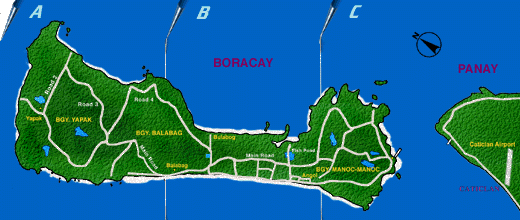 The "Boracay Map" is called "Navigation Map" here.It is divided into three areas A,B and C.
By clicking over one of the areas, its enlarged and detailed area map is shown.
The "Boracay Map" is called "Navigation Map" here.It is divided into three areas A,B and C.
By clicking over one of the areas, its enlarged and detailed area map is shown. 


 at the top of the area map page.
 on the left top of the photograph, it links to a related site.